|
Free download SysTracer 2.4

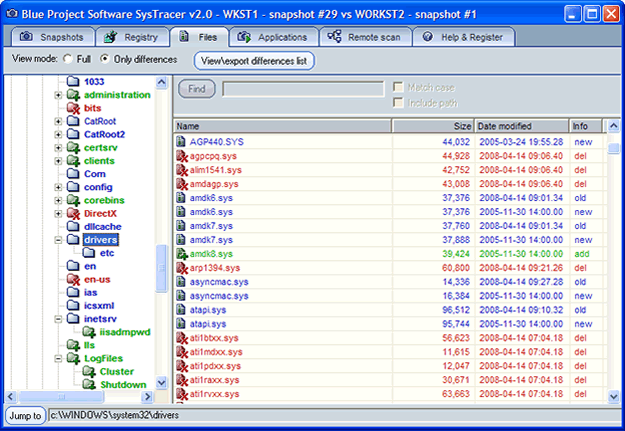
 SysTracer is a system utility tool that can analyze your computer for modified files, folders, registry entries, startup applications and windows services. Each scan of SysTracer generates an overview image of your system, image that we call snapshot. SysTracer is a system utility tool that can analyze your computer for modified files, folders, registry entries, startup applications and windows services. Each scan of SysTracer generates an overview image of your system, image that we call snapshot.
Information related to your files, folders, registry entries, running processes, loaded dlls, startup applications and services is stored in snapshot files for later analysis. You can create as many snapshots you may want.
If you want to see the differences between your system status at two different moments in time simply compare the snapshots you made at these points. You don't need to worry about remembering the differences. SysTracer will let you save them in a HTML file.
Now you can export registry differences between snapshots in .reg files (regedit format) in order to revert undesirable registry changes.
The process of recording snapshots takes usually a few minutes depending on your filesystem and registry complexity. Snapshots comparison is very fast - it's practically done in no time.
The user interface is so easy to use that you will don't need more than a few minutes to figure out how you can use it.
SysTracer 2.4 system utilities, registry tools software developed by Blue Project Software. The license of this system utilities, registry tools software is shareware, the price is 29.95, you can free download and get a free trial before you buy a license or registration. All SysTracer 2.4 download links are direct SysTracer full download from Blue Project Software site or their selected mirrors.
Keywords: system trace, file trace, registry trace, system snapshot, registry watch, file system info, view system changes, system tool, system watch, registry differences, file changes, registry changes, tracer, detect changes, system utility, registry, compare, Shareware, System Utilities, Registry Tools, Blue Project Software, SysTracer
Recent Changes: Option to exclude paths within scan selection. Detection of NTFS Symbolic Links, Junction Points and Registry Symbolic Links. GUI improvements.
Install Support: Install and Uninstall
Supported Languages: English
Additional Requirements: -
|




 (total votes: 0)


 AbleFTP 11.10: AbleFtp - FTP client designed to automate and run 1000+ FTP tasks a day.