|
Free download Easy Audio Editor 8.1

 With Easy Audio Editor you can: With Easy Audio Editor you can:
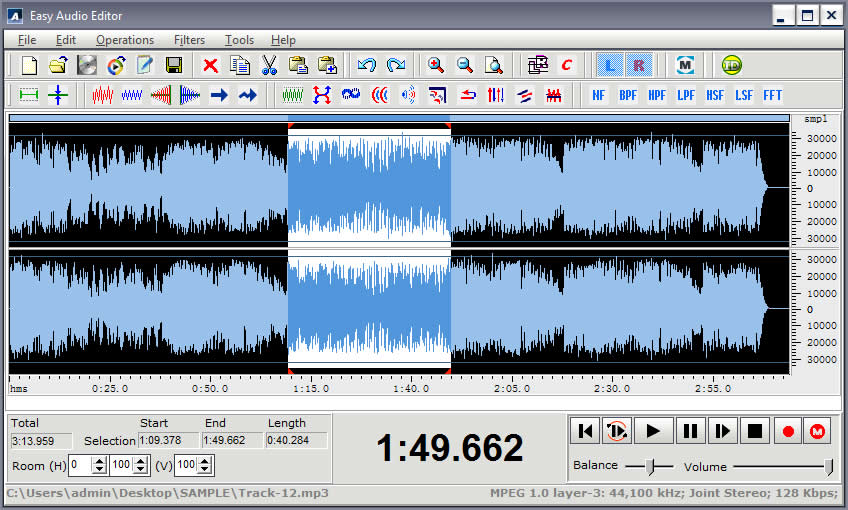
1 . Open, create, play and save audio files;
2 . Extract audio from video files;
3 . Display a waveform window of an audio file and apply zooming;
4 . Record new audio file from a microphone, sound card or other input devices (you can record audio from DVD / VCD / CD Player, MP3 Player, RealPlayer, Windows Media Player, Web Page, Internet Conversation, Internet News, Internet Radio Station and more);
5 . Visually edit an audio file (Delete, Cut, Copy, DeleteSilence, Paste, PasteFromFile, Mix, MixFromFile);
6 . Apply different effects (Amplify, Delay, Equalizer, Fade, Flanger, Invert, Normalize, Reverse, MultiTapDelay, Silence, Stretch, Vibrato, Echo, Chorus);
7 . Apply different filters to the selected part of an audio file (BandPass Filter, FFT Filter, HighPass Filter, HighShelf Filter,LowPass Filter, LowShelf Filter, Notch Filter);
8 . Insert noise or silence in an audio file;
9 . Convert an audio file from one format to another;
10 . Convert the sample type of audio files;
11. Insert and change information about audio markers (Count, Country, Dialect, Label, Language, Length, Note, Num, Position, Text);
12. Insert and change information about an audio file (Album, Artist, Channels, Comments, Copyright, Genre, Title, Year).
13. Use marker to locate the selected part or special part of the audio data.
The following audio formats are supported:
1. uncompressed WAV (PCM);
2. compressed WAV (ADPCM, A-LAW, U-LAW, DSP, GSM and others);
3. MP3 (MPEG Layer-3), MP2(MPEG Layer-2);
4. Ogg (Ogg Vorbis);
5. WMA (Windows Media Audio)
6. CDA (Audio CD Tracks);
7. AVI (Audio Stream);
8. AIFF (Apple);
9. AU (UNIX);
10. G.721, G.723, G.726.
11. VOX (Dialogic ADPCM);
12 .RAW;
13. MPC (MusicPack)
The following video formats are supported (extract audio from):
AVI (DivX, XviD, MS MPEG4, Uncompressed, Cinepak and other);
MPEG (MPEG-1, MPEG-2 Video);
WMV (Windows Media Video);
Quick Time (Apple video format)
Easy Audio Editor 8.1 audio & multimedia, audio encoders/decoders software developed by DanDans Digital Media. The license of this audio & multimedia, audio encoders/decoders software is shareware, the price is 34.00, you can free download and get a free trial before you buy a license or registration. All Easy Audio Editor 8.1 download links are direct Easy Audio Editor full download from DanDans Digital Media site or their selected mirrors.
Keywords: audio editor, audio editing, audio edit, audio convert, Shareware, Audio & Multimedia, Audio Encoders/Decoders, DanDans Digital Media, Easy Audio Editor
Recent Changes: Bug Fixed
Install Support: Install and Uninstall
Supported Languages: English
Additional Requirements: P166 64M
|




 (total votes: 0)


 JaSFtp 11.10: JaSFtp - Automated SFTP client (secure FTP), Run 1000+ tasks on a schedule.
 AbleFTP 11.10: AbleFtp - FTP client designed to automate and run 1000+ FTP tasks a day.