|
Free download Surfpack 2.0.135

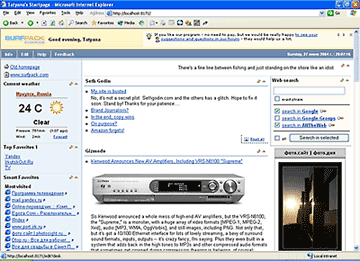
 Surfpack is an RSS reader that shows all content as a normal Web page inside Internet Explorer, Firefox and Opera. The program comes equipped with 2000 RSS feeds grouped in World News, Sports, Home, Computers, High Tech and other categories. You can also use Surfpack web plug-ins to access your Hot Favorites groups, more than 100 popular and specialized search engines, your latest downloaded files, Check Later Links and auto-generated lists of the Most Popular and Regularly Visited Sites right from your home page. Surfpack automatically restores long URLs broken by e-mail clients and keeps your startpage URL from being hijacked by Trojans and spyware. Surfpack is an RSS reader that shows all content as a normal Web page inside Internet Explorer, Firefox and Opera. The program comes equipped with 2000 RSS feeds grouped in World News, Sports, Home, Computers, High Tech and other categories. You can also use Surfpack web plug-ins to access your Hot Favorites groups, more than 100 popular and specialized search engines, your latest downloaded files, Check Later Links and auto-generated lists of the Most Popular and Regularly Visited Sites right from your home page. Surfpack automatically restores long URLs broken by e-mail clients and keeps your startpage URL from being hijacked by Trojans and spyware.
You can use ready-made home pages or edit/create your own pages by adding feeds in any format, including RSS, Atom, Javascript, HTML, XML and custom plug-in options. If you have a bit of Web design experience, you can create your own page templates using the bundled development kit.
Feeds display options include a user-friendly newspaper-like format, news headlines with a short description displayed in the cursor hint and also full news texts. Since Surfpack resides locally on your computer (unlike many other web pages) it loads instantly, even if you don't have an Internet connection established and frees you from logins, corporate-sponsored content, and ads.
Surfpack 2.0.135 network & internet, browser tools software developed by Softshape. The license of this network & internet, browser tools software is shareware, the price is 29.99, you can free download and get a free trial before you buy a license or registration. All Surfpack 2.0.135 download links are direct Surfpack full download from Softshape site or their selected mirrors.
Keywords: homepage, personal homepage, startpage, portal, browser, surfing, favorites, bookmark, bookmarks, manager, RSS, Atom, newsfeeds, feeds, news, Shareware, Network & Internet, Browser Tools, Softshape, Surfpack
Recent Changes: new major update
Install Support: Install and Uninstall
Supported Languages: English
Additional Requirements: Microsoft Internet Explorer 5.5+, Mozilla Firefox 1.0, or Opera 7.5
|




 (total votes: 0)


 JaSFtp 11.10: JaSFtp - Automated SFTP client (secure FTP), Run 1000+ tasks on a schedule.