|
Free download Easy CAD to SVG Converter 3.01

 This CAD2SVG converter allows you to publish your CAD drawings as SVG (Scalable Vector Graphics), an open-standard W3C standard for the presentation of compact and high-quality graphics on the web. This CAD2SVG converter allows you to publish your CAD drawings as SVG (Scalable Vector Graphics), an open-standard W3C standard for the presentation of compact and high-quality graphics on the web.
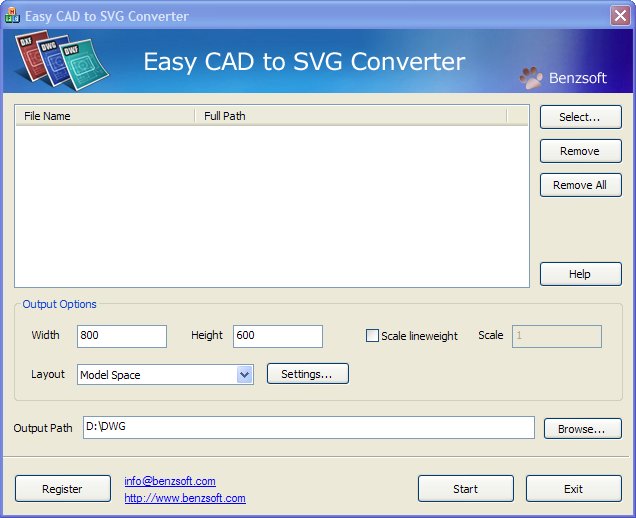
You can input any DWF, DWG, or DXF drawing, specify the output width and height, scale the line weight, choose model space, paper space, active layout, or all layouts, and then click Convert button to start the conversion. The speedy conversion process outputs 100% Adobe compliant SVG files that can be opened and viewed in any SVG viewer.
Easy CAD to SVG Converter is 100% ad free! Fully compatible with Windows 7 32bit and 64bit.
Features:
В· Convert AutoCAD 2012/2011/2010/2009/2008/2007/2006/2005/2004/2002/2000/R14/R9 DXF, DWG, DWF drawings to Adobe SVG files.
В· Choose paper space, model space, active layout, all layouts for conversion.
В· Customize line weight and scaling.
В· Specify output dimension such as height and width.
В· Support DWG, DXF, DWF files forward and backward with versions as early as AutoCAD Release 9 and as recent as AutoCAD 2012.
В· No need for Autodesk AutoCAD.
В· Compatible with Windows 7 x86 and x64
Easy CAD to SVG Converter 3.01 graphic apps, cad software developed by Benzsoft. The license of this graphic apps, cad software is shareware, the price is 99.00, you can free download and get a free trial before you buy a license or registration. All Easy CAD to SVG Converter 3.01 download links are direct Easy CAD to SVG Converter full download from Benzsoft site or their selected mirrors.
Keywords: dwg, svg, dxf, dwf, cad, convert, free, conversion, converter, dwg2svg, vector, scalable, graphics, Shareware, Graphic Apps, CAD, Benzsoft, Easy CAD to SVG Converter
Recent Changes: Support batch conversion on Windows 8 x86 and x64, Windows Server 8 32-bit and 64-bit
Install Support: Install and Uninstall
Supported Languages: English
Additional Requirements: AutoCAD not required
|




 (total votes: 0)


