|
Free download PDF Explorer 1.5.0.60
 
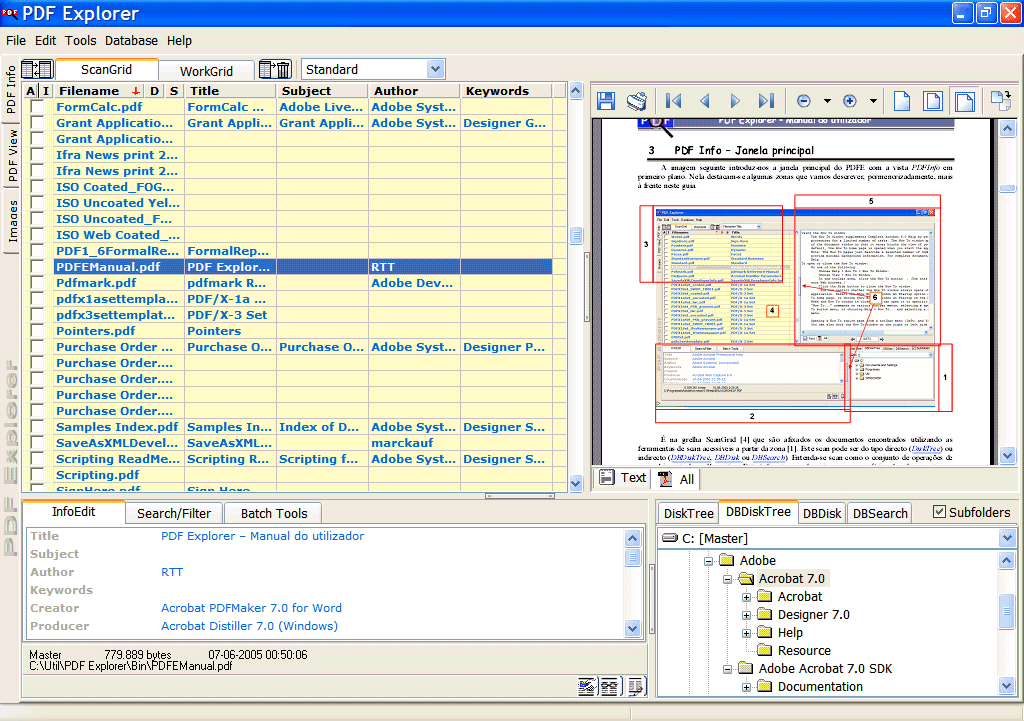
 PDF Explorer is a PDF, and CHM, files management software. It allows you to easily index to a database file all your PDF and CHM documents full text content and metadata fields such as: Filename, File size, File date, Title, Subject, Author, Creator, Producer, Creation Date, Modification Date and Number of Pages and a maximum of 100 more custom fields that can be used to include custom metadata. With PDF Explorer you can easily index your entire collection of PDF documents, spread by several disks, network places and also within ZIP, RAR, 7zip, and ACE compressed archives. You can then search through all the files using Boolean expressions and full text search, view them, extract images, extract text, Split, Merge, Stamp text, images and geometric shapes, anonymize, rotate pages, protect by password, attach files, find duplicates, apply batch functions including Windows Automation (JScript, VBScript, etc.) custom developed scripts, and much more. PDF Explorer can also read out loud the documents text so you can relax your eyes, or create wav or mp3 audio files so you can listen later. Easily reached from anywhere with the provided HTML web interface. Leave it running at home and access your database from work using only your web browser, or another instance of the program. PDF Explorer is a PDF, and CHM, files management software. It allows you to easily index to a database file all your PDF and CHM documents full text content and metadata fields such as: Filename, File size, File date, Title, Subject, Author, Creator, Producer, Creation Date, Modification Date and Number of Pages and a maximum of 100 more custom fields that can be used to include custom metadata. With PDF Explorer you can easily index your entire collection of PDF documents, spread by several disks, network places and also within ZIP, RAR, 7zip, and ACE compressed archives. You can then search through all the files using Boolean expressions and full text search, view them, extract images, extract text, Split, Merge, Stamp text, images and geometric shapes, anonymize, rotate pages, protect by password, attach files, find duplicates, apply batch functions including Windows Automation (JScript, VBScript, etc.) custom developed scripts, and much more. PDF Explorer can also read out loud the documents text so you can relax your eyes, or create wav or mp3 audio files so you can listen later. Easily reached from anywhere with the provided HTML web interface. Leave it running at home and access your database from work using only your web browser, or another instance of the program.
PDF Explorer 1.5.0.60 business, office suites & tools software developed by RTT. The license of this business, office suites & tools software is shareware, the price is 74.00, you can free download and get a free trial before you buy a license or registration. All PDF Explorer 1.5.0.60 download links are direct PDF Explorer full download from RTT site or their selected mirrors.
Keywords: pdf documents, images extraction, text extraction, pdf documents management, organizer, df merge, pdf split, pdf stamp, watermark, batch tools, full text search, compressed archives, TTS, SAPI, computer voices, speak to file, Read out loud, Shareware, Business, Office Suites & Tools, RTT, PDF Explorer
Recent Changes: - Windows Automation (JScript, VBScript, etc.) batch tool, with embedded scripts editor and debugger. - A new scan mode, the DBRemote. - Find Duplicates and Create/Edit PDF Packages tools. - Detachable PDF View and Images tab sheets. - Support for custom metadata fields defined in the XMP.
Install Support: Install and Uninstall
Supported Languages: English, Chinese, ChineseSimplified, ChineseTraditional, Czech, Danish, Dutch, French, Galician, German, Greek, Hebrew, Hungarian, Italian, Japanese, Other, Polish, Portuguese, Romanian, Spanish, Turkish
Additional Requirements: Not Established
|




 (total votes: 0)

