|
Free download X-NetStat 5.62
 
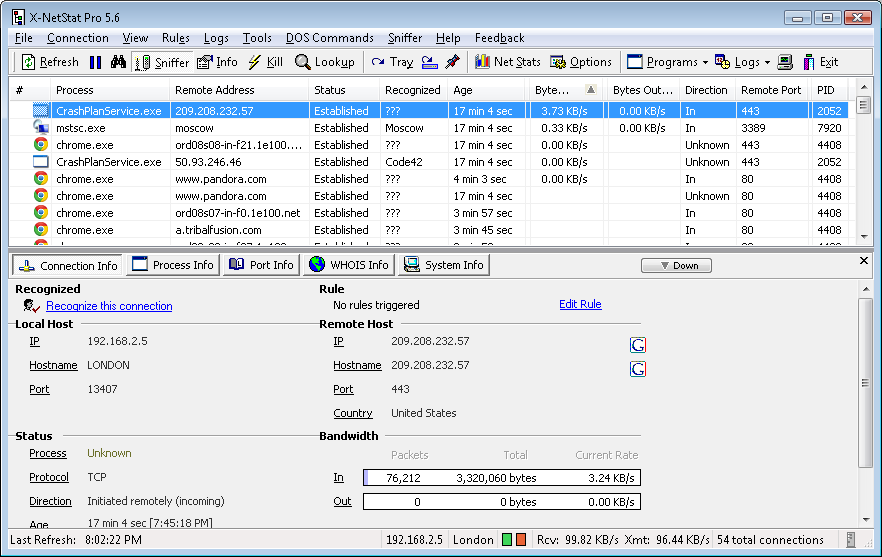
 X-NetStat shows your current Internet and network connections in realtime. These connections are established each time you visit a web page, send an instant message, check your email, or connect to another computer. They also appear when outside computers attempt to connect to your machine, authorized or not. X-NetStat shows your current Internet and network connections in realtime. These connections are established each time you visit a web page, send an instant message, check your email, or connect to another computer. They also appear when outside computers attempt to connect to your machine, authorized or not.
Information shown includes local and remote addresses, local and remote ports, the status, the age of the connection, how much bandwidth/traffic the connection is using, the program EXE behind it, and additional metadata. It's kind of like network radar, and you can even block unwanted connections.
Additional features for network administrators include a Rules system to set up actions based on network conditions, a Network Statistics window displaying information on network interfaces and protocols, a server that lets you access XNS information remotely, a collection of Lookup Tools (TraceRoute, WHOIS, Finger, DNS, Web Search, Server Version, NetBIOS Lookup, Online Tools, etc), a Port Database, Logging capabilities, transmission LED lights, a dockable ViewBar, and many more features.
X-NetStat 5.62 network & internet, network monitoring software developed by Fresh Software LLC. The license of this network & internet, network monitoring software is shareware, the price is 49.95, you can free download and get a free trial before you buy a license or registration. All X-NetStat 5.62 download links are direct X-NetStat full download from Fresh Software LLC site or their selected mirrors.
Keywords: netstat, xns, x-netstat, network, port, port monitor, stats, tcp, icmp, udp, whois, finger, trace, traceroute, firewall, trojan, server, snmp, finwait, established, radar, arin, sniffer, bandwidth, traffic, packet, packets, Shareware, Network & Internet, Network Monitoring, Fresh Software LLC, X-NetStat
Recent Changes: Firewall blocking
Can now retrieve service information
Trace IP to country, city
XNS Mail service
Updated and improved Programs button
Fixed a bug detecting 64-bit processes
Can now override Logs folder
Several bug fixes and improvements
Install Support: Install and Uninstall
Supported Languages: English
Additional Requirements: 64MB Ram recommended
|




 (total votes: 0)


 AbleFTP 11.10: AbleFtp - FTP client designed to automate and run 1000+ FTP tasks a day.